Showing posts with label egl. Show all posts

Monday, April 23, 2012

What's cooking in the EDT kitchen?

As we're incubating the EGL Development Tools (EDT) project, we want to keep everyone informed of our progress. We just finished EDT 0.8.0 (see our earlier post), and have started work on EDT 0.8.1.

We're trying to make it easier for more people and companies to use and contribute to the EDT community. You can find high-level plans on our wiki, or query Bugzilla for a low-level view which shows all of the enhancements currently planned for 0.8.1, though the list will grow during the lifetime of the release. (You can add the Target Milestone to the results using the Change Columns link below the list.)  We realize reading through Bugzilla query results isn't everyone's cup of tea, so we'll also post a weekly progress report (like this post) on the blog to help answer to the question "What are they working on?"

At the moment, we're working on the first of three milestones for the 0.8.1 release. The three main themes of this release are:
  • IDE usability - EGLAR support, source code analysis
  • Extensibility - improved extensibility of the compiler, generators, runtimes, and the deployment process
  • Language - implement more of the language in our generators and runtimes
Here's the list of what we worked on last week. It's meant to be short and sweet, so I don't mention the names of the developers, provide links to Bugzilla, or include estimates of when unfinished work will be done. Also, every week we're fixing defects, answering questions on the forum, writing documentation, etc. so I'm not going to mention those things here.

IDE Usability
  • Design and review the specification for EGLAR support
  • Read RBD's code for EGLARs
  • Investigate EGLAR project explorer
Extensibility
  • Prototype validation extensibility
  • Investigate runtime modularization: split runtimes into functional segments, generators add what is required during generation or deployment
Language
  • Added compiler support for bitwise operators and new types (bytes, time, limited string)
  • Update to content assist for the new types
  • Compiler support for foreach loop on arrays
  • Added bitwise operators, time and limited string types in Java
  • Added a validation check about passing nullable values
  • Work on JavaScript debug's label support
  • Wrote a design for EGLDoc (like Javadoc for EGL)
  • Investigate changing the compiler to keep comments (necessary for EGLDoc)
Other
  • Investigate integrating with new mobile technologies
We hope these weekly reports will help you stay informed about what's cooking in the EDT kitchen and spark your interest to join the other EDT chefs, or at least try out the resulting dish, I mean downloads.

As always, we look forward to hearing from you on the EDT forum.

Matt

Thursday, April 19, 2012

Updating to EDT 0.8 plus some tips

If you have an earlier version of EGL Development tools, either EDT 0.7 or a 0.8 milestone or nightly build, or if you don't have EDT at all yet, then we recommend you get the official EDT 0.8 build. So how do you do that? Well, there's a few ways.

One way is to download the EDT 0.8 all-in-one build from the download page. The all-in-one builds include the Java EE edition of Eclipse 3.7 and the EDT plugins. All you do is unzip and start Eclipse.

If you want to update an existing Eclipse or EDT, another way to get EDT 0.8 is to use the update site url: http://download.eclipse.org/edt/updates/1.0. Be sure this site is checked in the Available Site list under the Help>Install New Software menu. If you added the nightly or milestone sites, uncheck those. When you select the site, EGL Development Tools (EDT) 0.8.0 should appear in the list.

EDT update

And now the tips:

To use the 0.8 level of the Rich UI widgets and Dojo (based on Dojo toolkit version 1.7.2), create a new EGL Web 2.0 project and those projects should be automatically brought into your workspace. You can then retarget the EGL build path for any of your projects to the use these updated dependency projects.

As mentioned in the last blog announcing EDT, there's a few syntax changes that may require you to update your project code, including service definition and binding.

The samples have also been updated to version 0.8. You can get the samples from EDT's Documentation page, http://eclipse.org/edt/#doc. The samples are a good way to learn how to use the various widgets and overall functionality of EGL.

We hope you'll try out EDT 0.8.

Stay tuned for what's coming in EDT 0.8.1.

Theresa, EDT User Experience and Design

Friday, April 13, 2012

EGL Web Developer Tools version 0.8 is available...

... and with it, a proposed motto: "Ease of coding, ease of thought."

Here are some highlights of what's newly available:
  • The service-access mechanism is more uniform. When you develop a Rich UI application, you invoke an EGL dedicated service by fulfilling a two-step process that is characteristic of the language:

    1. Define a binding variable; for example:
         myBindingVar HttpProxy;
    2. Embed the variable in an action statement; for example:
         call MyServiceType.myFunction("abc")
              using myBindingVar
              returning to myResponseHandler
              onException myExceptionHandler;

    The two-step process is in effect not only for service access, but for database access, too. 
  • When you run the EGL deployer to prepare a service for Apache Tomcat, EGL configures the database JNDI detail for you, hiding the complexity.  
  • The IDE has more function:
    • You can use a wizard to write back-end logic for maintaining a database. Your investment? A few keystrokes, a few clicks.
    • You can use a wizard to create an external type. In this way, you can more easily reuse Java code in your application. And you can still use a manual process to create an external type from Java or JavaScript code.
  • You can configure the call statement to invoke code synchronously. Here's an example:
   result int;
   myString String = "abc";
   conn IBMiConnection? = 
         SysLib.getResource("binding:someEntry");
      try
         call MyHostProcedure(myString) 
            using conn
            returns (result);
      onException(exception AnyException)
         //handle exception
      end  

For now, the synchronous call statement is available only to invoke an IBM i program from EGL code that is generated to Java.
  • Did I mention support for IBM i?  We even provide a way to access an IBM i program from a Rich UI application.
  • Rich UI itself is improving:
    • To provide better download performance, we've reduced the size of the downloaded code and are switching to Asynchronous Module Definition, which is a standard technology for loading code on the web.
    • Support for Dojo is based on Dojo toolkit version 1.7.
    • Arbitrary data of any type can be stored and accessed by a Rich UI widget, for a more logical pattern of data assignment and use.
The technology is gaining value, whether you need to write spiffy web apps, access enterprise data, or do both. Why not take a closer look?

    Monday, April 9, 2012

    EDT @ EclipseCon 2012


    Last week I attended EclipseCon 2012 in Reston, Virginia, to present the EDT project as part of the Eclipse Hot New Product Showcase. While the EDT project did not win the award for Hot New Product, I did get a chance to talk to a lot of people about EDT, EGL, EDT Web Developer Tools, and Eclipse. If you have not had a chance to attend an EclipseCon, I would highly recommend making the trip.

    To prepare for my trip to EclipseCon, I worked with the team to create a handout that provides an overview of the EDT project. We felt that it was important for the handout to highlight two specific areas of the project; 1) an overview of EGL as a language and the goal of the EDT project to provide an extensible IDE for EGL, and 2) an overview of our first extension, which we have been calling EDT Web Developer Tools.  It was not easy to try and condense all of the information related to these topics onto two pages, but in the end I think we managed to make everything fit.

    In addition to providing the best information in the limited space available, we also felt that the handout should use the same graphical theme as the EDT project web site. We enlisted Rebecca, a graphics designer at ClearBlade, who helped us get the handout just right. Thanks, Rebecca!

    If you get a chance to look at the EDT Overview handout, let us know what you think! Is there anything that you would add or remove? There's a lot of content in EDT now and lots of ideas for the future, so we hope to get people as excited about it as we are.

    I enjoyed the sessions and talking to people EclipseCon. Thanks to the folks who stopped by the EDT table to hear what the EDT project is all about. As always, we would love to hear what you think about the project, so feel free to post a comment to this blog, or on the EDT Forum.

    -Brian

    Tuesday, March 27, 2012

    IDE test server overview

    One of the goals of EDT is to let you test your applications without having to configure and deploy to your target environment. However, we must also use care not to alter the behavior of the application when in test mode.

    The IDE test server (based on Jetty) is a major player in this regard, allowing you to invoke services from a Rich UI client without deploying them. Not only will the test server run the service right out of the EGL source project, it'll also automatically manages itself by updating configurations when files such as your deployment descriptors change. You don't even start the server yourself - it's started up when needed, and runs in the background. By the way, the server runs in debug mode, so you can set breakpoints in the service and step through the code.

    Now, there are some situations where the server needs to be restarted for changes to take effect. You'll be prompted if this happens, and given the choice to terminate the server now or let it keep running. The most typical case is when the Java debugger's hot code replace fails (e.g. you modified a part but the generated Java code contains a type of change that the Java debugger does not support "swapping in", such as a new global field).

    I mentioned previously that the server is started automatically, and an important addendum is that the server instance has a "base project", which dictates the classpath, the list of available deployment descriptors, etc. When invoking a service, one of the following rules is used to determine the "base project":
    • When invoking a dedicated service, the project of the main Rich UI handler is the base project.
    • When invoking a REST service, the project containing the service is the base project.
    This allows us to best match the deployed environment. If you open the Debug perspective, the Debug view will list all the test server processes. The process name will indicate the "base project" of that particular server, and there is only one server process per base project. You can use this information to terminate a specific project test server. (Once killed it'll get started back up automatically the next time it's needed.)

    Before I go, a couple tips:
    • When invoking a dedicated service, make sure the project containing the service is on the Java Build Path of the Rich UI project.
    • To invoke a service in a RESTful way, the service must be listed as a REST service in the deployment descriptor, otherwise it will not be exposed as a REST service (this is to match the deployed application's behavior). Then to use the test server instead of trying to invoke the deployed service, use the following workspace URI format for your REST binding: workspace://myServiceProject/myPackage.myService. If you use the 'http://' URI format then the test server will not be used.
    • If you're using JNDI database access in your services, you can benefit from connection pooling (which provides a significant performance boost) simply by defining an Apache Tomcat runtime at Window > Preferences > Server > Runtime Environments. Otherwise it'll still work, but will run slower.
    And if you're a developer looking to extend EDT, the test server can also be extended to support new concepts (information on this can be found on the wiki).

    -Justin

    Tuesday, March 20, 2012

    EDT 0.8 Milestone 3 now available

    The third and final milestone build for EDT 0.8 is now available for download. Check out the new and noteworthy page to learn more about this milestone.

    To install EDT 0.8 Milestone 3, you'll need to add the Milestone Build site to your Available Software Sites list under the Help>Install New Software menu option. We suggest you call the site "EGL Development Tools milestones". The site URL is: http://download.eclipse.org/edt/milestones/1.0/

    Once the milestone site has been added (which you may have done for a previous milestone), using Help>Check for Updates should find the newest milestone build.

    With this milestone, we've completed all the new function being added to EDT 0.8. We're pretty excited about the content! We'll be testing over the next few weeks. We welcome you to help the test effort! If you find a bug, you can open it in Bugzilla.

    As always, we welcome your feedback and questions on the EDT forum.

    Changes to the String type in EDT .8

    In EDT .8, the String type has been changed from a Value type to a Reference type.  (More information on Value types and Reference types can be found on the EDT Language Overview Wiki page) .  In general, this change will not have an impact on existing EGL code, but it is possible for existing functions to behave differently at runtime if they specify a parameter of type String, and do not specify an explicit modifier (i.e. 'in', 'inout', etc).

    In EDT, the default modifier for a Value type function parameter is 'inout', which means that the original value is passed to the function parameter, instead of a copy, and any changes made to the parameter in the function will be visible to the caller of the function.  For example:


    function func1()
      var1 int = 2;  // int is a Value type
      addOneFunction(var1); 
      // var1 is now 3
    end

    function addOneFunction(param1 int)
      param1 += 1;  // Add one to param1
    end


    In EDT, the default modifier for a Reference type function parameter is 'in', which means that a copy of the value is passed to the function parameter, and any changes made to the parameter in the function will not be visible to the caller of the function.  For example:


    function func1()
      var1 Decimal = 2; // decimal is a Reference type
      doNotAddOneFunction(var1); 
      // var1 is still 2
    end

    function doNotAddOneFunction(param1 Decimal)
      param1 += 1;  // Add one to param1
    end


    Now that Strings are Reference types in EDT, code that used to rely on the default behavior of the 'addOneFunction' will produce different results, similar to the 'doNotAddOneFunction' function, if an explicit modifier is not specified.  For example:


    function func1()
      var1 String;
      modifyString(var1); 
      // In EDT .7, var1 would be "Modified String"
      // In EDT .8, var1 will now be ""
    end

    function modifyString(param1 String)
      param1 += "Modified String";
    end


    To resolve these issues, you can add an explicit modifier to the function parameter:

    function modifyString(param1 String inout)


    Additional information on Reference types and Function Parameters
    When a reference type is passed to a function parameter using the 'in' modifier, a copy is made by allocating new memory for the parameter that points to the same memory as the value being passed to the function.  If you assign the parameter a new value, only the memory allocated for the parameter is updated to point to the memory used by the new value. 

    When a reference type is passed to a function parameter using the 'inout' modifier, the parameter essentially maps to the same memory as the value being passed into the parameter.  If you assign the parameter to a new value, the value passed into the function is updated as well, since the parameter represents the same memory as the original value.

    -Brian

    Tuesday, March 6, 2012

    I say Snippet...Snippet Good

    One of the goals of the EDT project is to provide a large collection of source code examples, known as snippets, that show how to complete various tasks in EGL. These code samples can be very useful for someone that has never written an application in EGL before, and they can help experienced EGL developers remember how to write an infrequently used operation, or educate themselves on previously unused parts of the language.  The current collection of EGL snippets can be found on the EDT Code Snippets wiki page, which is conveniently broken down into sections on; EGL native types, user defined types, statements, database access, services, and Rich UI development. 

    While most snippets are only a few lines long, and describe how to use a particular statement or type found in the EGL language, there are some snippets that describe higher level concepts that are often used in a typical EGL application.  An example of a small snippet is the following, which shows how to declare a new Dictionary with some initial values:

    http://wiki.eclipse.org/EDT:Declaring_data#Values_of_type_Dictionary

    An example of a larger snippet, which shows how to load multiple rows of values from a database, can be found in the section on working with a database:

    http://wiki.eclipse.org/EDT:Working_with_a_database#Getting_multiple_rows_with_one_statement
    While there is a lot of content on these pages, there is always room for more!  If you have a suggestion, feel free to post a comment to this blog entry, and we can see about adding it to the collection.  Better yet, if you're an Eclipse member, you can add the snippet yourself using the instructions found on the snippet page.  Once you see how easy it is to add a new snippet (I added one to the Dictionary section while writing this blog entry and with Devo songs running through my head), you will hopefully find yourself adding many new snippets to share with the EDT community.

    Brian

    Tuesday, February 28, 2012

    EDT 0.8 Milestone 2 now available

    The second milestone build for EDT 0.8 is now available for download.  Check out the new and noteworthy page to learn more about this milestone. In particular, we've added support for JNDI and IBM i.

    To install EDT 0.8 Milestone 2, you'll need to add the Milestone Build site to your Available Software Sites list under the Help>Install New Software menu option. We suggest you call the site "EGL Development Tools milestones".  The site URL is: http://download.eclipse.org/edt/milestones/1.0/

    Once the milestone site has been added (which you may have done for Milestone 1), using Help>Check for Updates should find any new milestone builds. For more information about what's coming in the next milestone of EDT 0.8, see the EDT 0.8 Planning page.

    As always, we welcome your feedback and questions on the EDT forum.

    Two down, one to go!

    Monday, February 20, 2012

    Using the Rich UI editor

    The Rich UI editor allows you to visually create a web application. Once you have created an EGL web 2.0 project, you can add a Rich UI handler to it. The Rich UI handler provides a default template that includes a GridLayout to help with placement of widgets on the page. In the Design view, you can drag and drop widgets from the Palette onto any cell of the GridLayout.  Use the Properties tab to edit the widget, such as changing border, spacing, or alignment.

    Decide you want to move a widget? Just drag and drop it to a new location. Need more space for widgets? Increase the number of rows and columns for the GridLayout using the Properties, or right-click within a GridLayout cell and select Insert to add a row or column above or below the current cell.  (You can also Delete rows and columns via right-clicking on the GridLayout.)


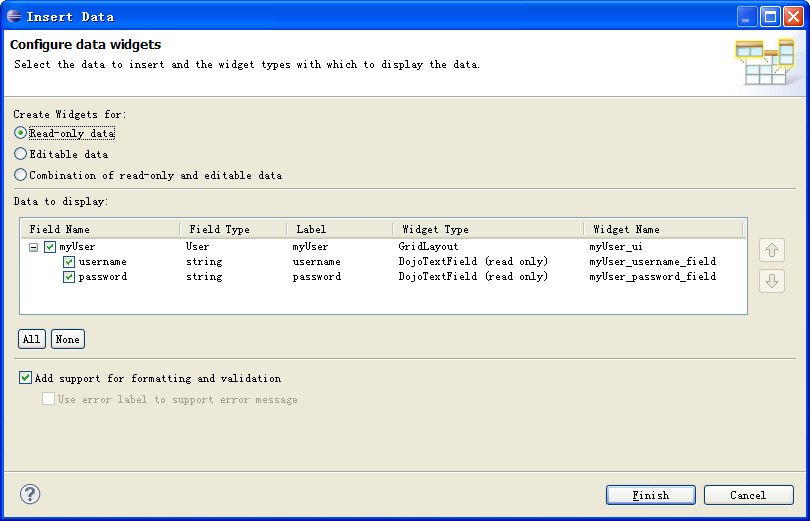
    One of our favorite features of the Rich UI editor is the ability to auto-generate a UI based on an EGL variable. You can drag-and-drop an EGL variable, such as a record type, from the EGL Data view to the Design view. The Insert Data wizard let's you select the fields to appear along with label, widget type and name.


    To help you get started using the Rich UI editor, members of our development team in China have developed a tutorial to Create a Rich UI logon page.  This tutorial is a good way to familiarize yourself with the Rich UI editor for EGL. The tutorial covers using the Insert Data wizard as a quick way to create the UI from a record, as well as creating an event handler and testing the page using Preview.

    Theresa

    Monday, February 6, 2012

    Testing using EGL Unit (EUnit)

    EGL Unit (EUnit) is a testing framework provided with EDT to develop test variations, generate driver programs, and validate the runtime results. You develop your tests once in EGL and execute them on all desired platforms using EDT generators, your extensions, and/or your own generators. The driver program is convenient to produce, simple to run, and the pretty results easy to analyze. Once you’ve built a set of test variations that validates the core logic of your application, the framework allows you to quickly assert the quality of your foundation. 


    For step-by-step instructions on how to write, generate, execute, and review test cases, see the EUnit wiki page. Here’s a sample EUnit test library to illustrate the simplicity and power of the framework. This statusTest library has five test variations and displays the possible test results.

    package framework;

    // basic EUnit test library for testcase status
    library statusTests
          
           function testStatusPassed(){@Test}
               LogResult.assertTrue1(100 > 50 );
           end
          
           function testStatusPassed02(){@Test}
               actual string = "restraint";
               expect string = "restraint";
               LogResult.assertStringEqual1(actual, expect);
           end
          
           function testStatusFailed(){@Test}
               success boolean = 100 < 50;
               LogResult.assertTrue("Testing fail condition", success );
           end
          
           function testStatusError(){@Test}
               stuff int[] {1,2,3,4};
               actual int = stuff[13];
               LogResult.assertBigIntEqual1(3, actual);
           end
          
           function testStatusSkipped() {@Test}
               LogResult.logStdOut("Some info about the defect");
               LogResult.skipped("Bugzilla xxxx. Compile problem.");
           End
    end

    A test variation needs to include the test annotation {@Test} and use one of the LogResults assert functions. Using content assist is a great away to check out the available assertion functions.  To ensure your foundation, you want your test variations to be used frequently and interpreted by anyone. The skipped function denotes a variation that has a known issue and logStdOut allows for additional information to be included.  For the prettiest view of the results, you will need Business Intelligence and Reporting Tools (BIRT). Here’s the Statistics Chart:


    This chart provides a quick color-coded summary count of passing and non-passing test cases for all the test libraries exercised by the driver program. For more detailed information, you can open the individual report (.etr) for each library.  Here’s the detailed report for the statusTest library:


    Framework.statusTests

    Reason: test case count: 5

    passed: 2
    failed: 1
    error: 1
    skipped: 1
    first test case with error: statusTests::testStatusFailed

    msg:
    statusTests::testStatusPassed: OK
    statusTests::testStatusPassed02: OK
    statusTests::testStatusFailed: FAILED - Testing fail condition
    statusTests::testStatusError: ERROR - uncaught exception for: statusTests::testStatusError
        => EGL0010E: List index 12 is out of bounds. The list's size is 4.
    Some info about the defect
    statusTests::testStatusSkipped: SKIPPED - Bugzilla xxxx. Compile problem.

    The file provides a convenience link to the associated EGL library in case the test case needs to be reviewed or altered. The file contains the totals by status (passed, failed, etc.), indicates the first failing test case by identifying the function name.  The msg section provides detailed information for each test variation.  It is common for a developer to run the tests, save the result root, apply code changes, rerun the tests, and compare the results files to ensure the expected core behavior.


    Utilizing the EUnit test framework will help you ensure the solid foundation of your application. You just need to evolve the test suite along side your application.
    The EUnit framework can be used to automate your testing efforts. Please post any features you’d like to see in EUnit, as we hope to add more to this useful tool.


    Kathy

    Tuesday, January 31, 2012

    EDT 0.8 Milestone 1 now available

    The first milestone build for EDT 0.8 is now available for download.  Check out the new and noteworthy page to explore the 60+ bug fixes and enhancements (and more) in this milestone.

    You may be thinking - what's the difference between the different builds available on the download page? A release build is rigorously tested, so end users may want to stick with 0.7 until 0.8 is released. Also, a release is provided as an all-in-one installation package which includes the Eclipse IDE for Java EE Developers and EDT features so it's easy to unzip and go. Milestone builds are generally declared every couple weeks, while nightly builds, as the name suggests, are built nightly from the most recent code. Milestone builds are tested, though not as much as release builds. Developers who want recent, stable code can use the milestone builds. If you want to be on the bleeding edge, you can opt for the nightly builds. Milestone and nightly builds need to be installed into an existing Eclipse environment using the update site functionality.

    To install EDT 0.8 Milestone 1, you'll need to add the Milestone Build site to your Available Software Sites  list under the Help>Install New Software menu option. We suggest you call the site "EGL Development Tools milestones".  The site URL is:  http://download.eclipse.org/edt/milestones/1.0/

    Pick this new site in the Work with field and then select EGL Development Tools (EDT) 0.8 feature in the list. Continue through the wizard, accept the license agreement, and click Finish to begin the installation.

    Now that the milestone site has been added, using Help>Check for Updates should find any new milestone builds. For more information about what's coming in the next milestones of EDT 0.8, see the EDT 0.8 Planning page.

    As always, we welcome your feedback and questions on the EDT forum.

    Theresa

    Thursday, January 12, 2012

    Creating EGL projects

    Creating a project is the first step to programming in EGL. Luckily, it's pretty easy! Once you have the the Eclipse EGL Development Tools installed and are in the EGL perspective, select File > New > EGL project and the EGL project wizard leads you through creating the project and specifying its settings.

    There are 4 project templates you can base your new project on:

    1. Basic - for developing EGL programs, services, and libraries.
    2. Web 2.0 client - for developing rich web applications that use existing web services
    3. Web 2.0 client with services - for developing rich web applications and new web services
    4. Hello world - an example project that contains rich web application and service

    Besides the project template, the only required information is the project name. So once you type a project name, you could hit Finish and your new project will appear in the Project Explorer. The folders and settings for your new project are based on the project template you selected.

    For more curious folks that want to see or change project settings such as package names, compilers and generators, widget libraries, and the EGL build path, you can click Next to proceed through the wizard pages. The EDT: New Project wizard wiki page contains more details about the project settings, as well as information about extending the project wizard with your own template and settings.  

    We'd love to hear about the new EGL projects you are creating!

    Theresa

    Thursday, December 15, 2011

    What is EGL and why should I care?

    Every time a proposed or new programming language comes along the inevitable question is: 'do we really need another programming language?'. In my humble opinion unless it does something significantly different from other programming languages then the answer is usually no. So what makes EGL different from other programming languages such that it is worth taking a look at?

    EGL is often described as a 4GL. When EGL was only accessible in the context of IBM products and was a closed black box this view was reasonable. However, the current Eclipse implementation is not just the rehash of that closed system in an open source arena; it is a completely generalized and extensible framework for expressing domain specific concepts in a programming language together with an extensible compiler/code generation framework. EGL the progamming language itself actually only provides a syntax and compiler for creating and validating instances of the EGL meta model; the real meat is in the code generators which read these models to produce code. Furthermore any code generator can be extended to add new progamming model elements, or change existing code generation patterns without affecting the original generator. New generators can be written to target runtimes that may not exist today. A good example a new generator would be one targeting an Objective C runtime instead of Java or Javascript. An example of an extended generator would be one that was built upon the base Java generator but was extended to also understand how to map user interface application concepts to an Android runtime framework.

    This approach of a defining models and mapping them to runtime using a Model Compiler may seem familiar to some as classic Model Driven Development (MDD). In many ways this is true. However the point of EGL is to do everything in the programming language, including the modeling itself, so that one never has to edit the generated code. In other words, the model IS the code. Futhermore, the tools within the EDT project also provide debugging in terms of EGL, not the generated code though that is always possible as well.

    What the EDT project is really about is providing a programming language infrastructure in which the low level 'assembler' languages generated are the well established runtime languages of the given target platform instead of the bytes codes of a VM or hardware. The current functionality of EDT 0.7.0 just released is really just one implementation aimed at the domain of Web 2.0 based client/server business applications where the target runtime platforms are browsers for the client and JEE based services. Other choices can be made and extensions to the current choices can and will be added.

    EGL is not meant to replace existing languages and frameworks. It is instead meant to leverage what already exists and to be molded onto whatever comes in the future. This can be done because EGL itself is a 'meta' language in relation to something like JavaScript in a way similar to the relationship between traditional 3GL languages and the assembler they generate. What is different here compared to other 4GLs that generate 3GL code is that the programming models surfaced to EGL programmers are extensible and the code generation that maps those programming models to real runtime is also completely extensible.

    So what does all of this buy us? Some examples:
    • Common programming language across all application tiers

    • Common definitions of shared components across tiers enabling a DRY (Don't Repeat Yourself) disipline. Typical example is data definitions and validation logic that must exist in both the client and the server and often in batch applications as well.

    • Changes in choices of middleware and frameworks and even runtime platform can be managed by updating the compiler and regenerating instead of being stuck with whatever choice was made at the time. This presupposes that the programming model abstracted the semantics of what the given framework or middleware was doing. Typical examples are things like persistence, remote invocation, transaction management , business rule definition and management, etc.

    Is EGL for everyone and every problem? No. However, there are several kinds of situations in which EGL is an ideal solution:
    • Multi-tiered applications which target multiple platform technologies and must integrate with existing investments. Integrating across these technologies using the technologies of the systems themselves is tremendously hard. Even if you get a particular solution to work it is likely the underlying technology choices made to support it will need to change over time. If the solution is done with EGL, it is both easier to program and maintain along with being flexible enough to change the underlying target technologies when the need arises.

    • Common application components which need to deploy to multiple environments

    • Flexibility in using staff in producing code across technology boundaries. This one comes from the fact that the ability to create application components that target a given platform has been limited to those who are proficient in that platform's typical programming language. While it is absolutely necessary to have those people it should not be the case that building a business application requires the platform skills of all the places the application components may be deployed. I have seen kids coming out of college able to build applications deploying to the mainframe right out the gate. I have also seen COBOL programmers able to produce Web 2.0 client server applications. The point is that too often the actual important skill of knowing the business is not accounted for. A technology like EGL allows organizations to leverage that important skill for their new applications.

    I hope this blog has clarified somewhat the point of EGL and why it is not just another programming language doing what has already been done. People take their programming language of choice seriously and EGL is not trying to replace those choices. It is simply saying that in today's ultra complicated world there is a need for a way of writing, managing, and maintaining applications at a higher and more productive level of abstraction and that compiler technology has always done this well. Let the best of those skilled in those particular technologies express the best of their knowledge into a model compiler so the rest of the world can take advantage of that knowledge.

    In the near future we will be having a place out in EDT for 'Extensions'. These will be examples of how EDT is extended to solve particlar problems of interest to the community. Those that get enough people interested will end up producing sub projects under EDT to bring the given extension to production quality. It is these kinds of projects which will bring out the true nature of what EDT is aiming at.

    Friday, December 9, 2011

    Differences between EDT and Rational Business Developer

    We created a new wiki page to highlight some of the differences between EGL Development Tools (EDT) and Rational Business Developer.  The changes discussed include:
    • EGL Language 
    • Relational Database Access
    • Service Oriented Architecture
    • Generation - Configuration and Invocation
    • IDE
    • Debugging
    • Widgets
    • Moving applications from RBD to EDT
    If you have used RBD and notice something missing from this wiki page, feel free to add it so that others can benefit from your experience.


    Brian


    Thursday, December 8, 2011

    0.7 is here!

    It took a little longer than planned, but the 0.7 release of the Eclipse EGL Web Developer Tools is now available. Visit the Eclipse EGL Development Tools (EDT) page for a list of features, a new Getting Started tutorial, links to samples, and, of course, a link to download.

    Big thanks to the developers who put in lots of long hours to get 0.7 out the door. Also, a big thanks to our friends at ClearBlade for helping create the fancy new graphics on the site.

    Thanks,
    Will


    Tuesday, November 1, 2011

    0.7 M3 is here!

    The third milestone of version 0.7 of the Eclipse EGL Development Tools (EDT) project is now available for download. M3 adds some seriously cool enhancements and is also more stable than M2. However, it is still just a milestone build, so understand that it's not perfect yet. If you run into problems, visit the support page to find links to Bugzilla and to the EDT forum.

    As mentioned, there were some really cool things added in M3, both from a tooling and a generation perspective. The tooling is really coming together, and you should have no problem creating a new EGL project, writing some code, and running it. There's also now a WYSIWYG visual editor, which really speeds up the design process for EGL Rich UIs (i.e. EGL parts that compile into JavaScript and execute in a browser). Dojo support is now built-in, giving you 30+ Dojo widgets to use in your EGL applications.

    Other noteworthy enhancements:
    1. Debug support for EGL targeted for Java or JavaScript (so, set breakpoints in and step through EGL code using the Eclipse Debug tools)

    2. Improvements to the source editor, specifically content assist (rebuilt from the ground up), formatting, and import organization

    3. Deployment (so, support for deploying EGL UIs and services into a standard web project as Java and JavaScript and deploying to an application server)

    4. SQL/relational database support

    For more details on these or for a complete list of new features, see the New and Noteworthy page. Keep your eyes peeled for the 0.7 released (see the planning page) - currently planned for December 2. This release will add additional features and will be even more stable than M3.

    Will

    Thursday, October 27, 2011

    Welcome to the official Eclipse EDT team blog

    I would like to introduce myself and this new blog where the team will provide the latest information on the EDT (EGL Development Tools) project on Eclipse. While the our first official release of EDT is still in the works (version 0.7.0 is coming soon!), we wanted to get the communication started to foster a vibrant open-source community for crafting of this technology. Come here to find the status of the project, plans and design discussions, as well as how-to articles.

    My name is Tim W Wilson and I am the project lead for the EDT project. For the past decade or so, I have been the lead architect for IBM Rational Business Developer which contained the previous proprietary incarnation of EGL (Enterprise Generation language). 

    The movement of this proprietary technology to the open source arena is what the EDT project is all about.  Yet it is more than just moving this technology to a new space. The new EGL is a generalization of this  programming language technology.  EGL is now extensible such that abstract concepts can be added to the language similar to how UML Profiles add semantics to models. The code generation is designed to be easily extensible such that these new concepts can be folded into existing code generators. Plus, a full set of Eclipse-based IDE tools used to create, build and debug EGL applications is also part of the grand scheme.

    What is this grand scheme you ask?  Without going into too much detail, the purpose of EDT is to provide a platform for building extensible model compilers where the models and the implementation of the operations on those models is fully specified in a programming language, i.e. the Model is the Code. Approaches like UML and action languages are along similar lines but the new EGL starts as a programming language for everything instead of pictures mixed with code. This together with a highly extensible code generation infrastructure leads to the ability to create domain specific compilers. A good example of how such technology can be used is to be able to target Android, iOS and web runtime platforms all with the same code. (Look for a blog post on that topic in the near future.)

    As we put the finishing touches on EDT version 0.7.0, we hope you will download EDT and let us know what you think. We encourage you to provide comments and questions on the eclipse-egl forum.

    Remember to check back at this blog. We looking forward to sharing more exciting news about EDT. 

    Tim