The second milestone build for EDT 0.8 is now available for download. Check out the new and noteworthy page to learn more about this milestone. In particular, we've added support for JNDI and IBM i.
To install EDT 0.8 Milestone 2, you'll need to add the Milestone Build site to your Available Software Sites list under the Help>Install New Software menu option. We suggest you call the site "EGL Development Tools milestones". The site URL is: http://download.eclipse.org/edt/milestones/1.0/
Once the milestone site has been added (which you may have done for Milestone 1), using Help>Check for Updates should find any new milestone builds. For more information about what's coming in the next milestone of EDT 0.8, see the EDT 0.8 Planning page.
As always, we welcome your feedback and questions on the EDT forum.
Two down, one to go!
Tuesday, February 28, 2012


Monday, February 20, 2012
Using the Rich UI editor
The Rich UI editor allows you to visually create a web application. Once you have created an EGL web 2.0 project, you can add a Rich UI handler to it. The Rich UI handler provides a default template that includes a GridLayout to help with placement of widgets on the page. In the Design view, you can drag and drop widgets from the Palette onto any cell of the GridLayout. Use the Properties tab to edit the widget, such as changing border, spacing, or alignment.
Decide you want to move a widget? Just drag and drop it to a new location. Need more space for widgets? Increase the number of rows and columns for the GridLayout using the Properties, or right-click within a GridLayout cell and select Insert to add a row or column above or below the current cell. (You can also Delete rows and columns via right-clicking on the GridLayout.)

One of our favorite features of the Rich UI editor is the ability to auto-generate a UI based on an EGL variable. You can drag-and-drop an EGL variable, such as a record type, from the EGL Data view to the Design view. The Insert Data wizard let's you select the fields to appear along with label, widget type and name.

To help you get started using the Rich UI editor, members of our development team in China have developed a tutorial to Create a Rich UI logon page. This tutorial is a good way to familiarize yourself with the Rich UI editor for EGL. The tutorial covers using the Insert Data wizard as a quick way to create the UI from a record, as well as creating an event handler and testing the page using Preview.
Theresa
Decide you want to move a widget? Just drag and drop it to a new location. Need more space for widgets? Increase the number of rows and columns for the GridLayout using the Properties, or right-click within a GridLayout cell and select Insert to add a row or column above or below the current cell. (You can also Delete rows and columns via right-clicking on the GridLayout.)
One of our favorite features of the Rich UI editor is the ability to auto-generate a UI based on an EGL variable. You can drag-and-drop an EGL variable, such as a record type, from the EGL Data view to the Design view. The Insert Data wizard let's you select the fields to appear along with label, widget type and name.
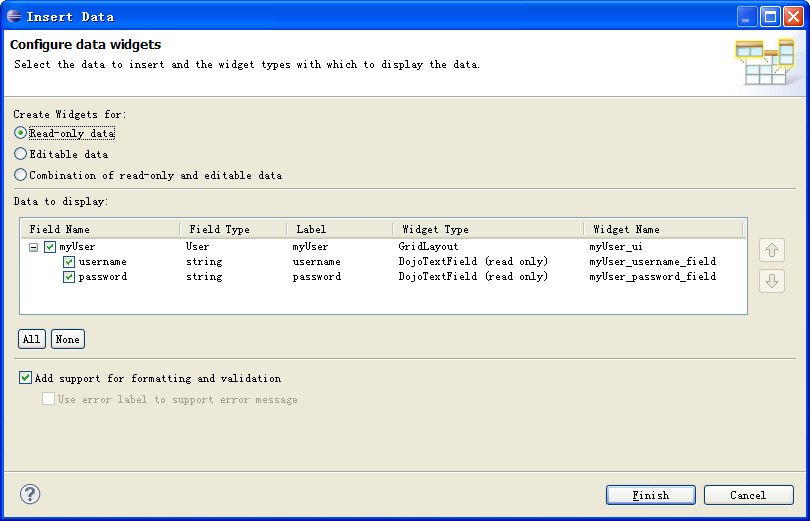
To help you get started using the Rich UI editor, members of our development team in China have developed a tutorial to Create a Rich UI logon page. This tutorial is a good way to familiarize yourself with the Rich UI editor for EGL. The tutorial covers using the Insert Data wizard as a quick way to create the UI from a record, as well as creating an event handler and testing the page using Preview.
Theresa
Monday, February 6, 2012
Testing using EGL Unit (EUnit)
EGL Unit (EUnit) is a testing framework provided with EDT to develop test variations, generate driver programs, and validate the runtime results. You develop your tests once in EGL and execute them on all desired platforms using EDT generators, your extensions, and/or your own generators. The driver program is convenient to produce, simple to run, and the pretty results easy to analyze. Once you’ve built a set of test variations that validates the core logic of your application, the framework allows you to quickly assert the quality of your foundation.
For step-by-step instructions on how to write, generate, execute, and review test cases, see the EUnit wiki page. Here’s a sample EUnit test library to illustrate the simplicity and power of the framework. This statusTest library has five test variations and displays the possible test results.
For step-by-step instructions on how to write, generate, execute, and review test cases, see the EUnit wiki page. Here’s a sample EUnit test library to illustrate the simplicity and power of the framework. This statusTest library has five test variations and displays the possible test results.
package framework;
// basic EUnit test library for testcase status
library statusTests
function testStatusPassed(){@Test}
LogResult.assertTrue1(100 > 50 );
end
function testStatusPassed02(){@Test}
actual string = "restraint";
expect string = "restraint";
LogResult.assertStringEqual1(actual, expect);
end
function testStatusFailed(){@Test}
success boolean = 100 < 50;
LogResult.assertTrue("Testing fail condition", success );
end
function testStatusError(){@Test}
stuff int[] {1,2,3,4};
actual int = stuff[13];
LogResult.assertBigIntEqual1(3, actual);
end
function testStatusSkipped() {@Test}
LogResult.logStdOut("Some info about the defect");
LogResult.skipped("Bugzilla xxxx. Compile problem.");
End
end
A test variation needs to include the test annotation {@Test} and use one of the LogResults assert functions. Using content assist is a great away to check out the available assertion functions. To ensure your foundation, you want your test variations to be used frequently and interpreted by anyone. The skipped function denotes a variation that has a known issue and logStdOut allows for additional information to be included. For the prettiest view of the results, you will need Business Intelligence and Reporting Tools (BIRT). Here’s the Statistics Chart:

This chart provides a quick color-coded summary count of passing and non-passing test cases for all the test libraries exercised by the driver program. For more detailed information, you can open the individual report (.etr) for each library. Here’s the detailed report for the statusTest library:
Framework.statusTests
Reason: test case count: 5
passed: 2
failed: 1
error: 1
skipped: 1
first test case with error: statusTests::testStatusFailed
msg:
statusTests::testStatusPassed: OK
statusTests::testStatusPassed02: OK
statusTests::testStatusFailed: FAILED - Testing fail condition
statusTests::testStatusError: ERROR - uncaught exception for: statusTests::testStatusError
=> EGL0010E: List index 12 is out of bounds. The list's size is 4.
Some info about the defect
statusTests::testStatusSkipped: SKIPPED - Bugzilla xxxx. Compile problem.
The file provides a convenience link to the associated EGL library in case the test case needs to be reviewed or altered. The file contains the totals by status (passed, failed, etc.), indicates the first failing test case by identifying the function name. The msg section provides detailed information for each test variation. It is common for a developer to run the tests, save the result root, apply code changes, rerun the tests, and compare the results files to ensure the expected core behavior.
Utilizing the EUnit test framework will help you ensure the solid foundation of your application. You just need to evolve the test suite along side your application.
The EUnit framework can be used to automate your testing efforts. Please post any features you’d like to see in EUnit, as we hope to add more to this useful tool.
Utilizing the EUnit test framework will help you ensure the solid foundation of your application. You just need to evolve the test suite along side your application.
The EUnit framework can be used to automate your testing efforts. Please post any features you’d like to see in EUnit, as we hope to add more to this useful tool.
Kathy
Tuesday, January 31, 2012
EDT 0.8 Milestone 1 now available
The first milestone build for EDT 0.8 is now available for download. Check out the new and noteworthy page to explore the 60+ bug fixes and enhancements (and more) in this milestone.
You may be thinking - what's the difference between the different builds available on the download page? A release build is rigorously tested, so end users may want to stick with 0.7 until 0.8 is released. Also, a release is provided as an all-in-one installation package which includes the Eclipse IDE for Java EE Developers and EDT features so it's easy to unzip and go. Milestone builds are generally declared every couple weeks, while nightly builds, as the name suggests, are built nightly from the most recent code. Milestone builds are tested, though not as much as release builds. Developers who want recent, stable code can use the milestone builds. If you want to be on the bleeding edge, you can opt for the nightly builds. Milestone and nightly builds need to be installed into an existing Eclipse environment using the update site functionality.
To install EDT 0.8 Milestone 1, you'll need to add the Milestone Build site to your Available Software Sites list under the Help>Install New Software menu option. We suggest you call the site "EGL Development Tools milestones". The site URL is: http://download.eclipse.org/edt/milestones/1.0/
Pick this new site in the Work with field and then select EGL Development Tools (EDT) 0.8 feature in the list. Continue through the wizard, accept the license agreement, and click Finish to begin the installation.

Now that the milestone site has been added, using Help>Check for Updates should find any new milestone builds. For more information about what's coming in the next milestones of EDT 0.8, see the EDT 0.8 Planning page.
As always, we welcome your feedback and questions on the EDT forum.
Theresa
You may be thinking - what's the difference between the different builds available on the download page? A release build is rigorously tested, so end users may want to stick with 0.7 until 0.8 is released. Also, a release is provided as an all-in-one installation package which includes the Eclipse IDE for Java EE Developers and EDT features so it's easy to unzip and go. Milestone builds are generally declared every couple weeks, while nightly builds, as the name suggests, are built nightly from the most recent code. Milestone builds are tested, though not as much as release builds. Developers who want recent, stable code can use the milestone builds. If you want to be on the bleeding edge, you can opt for the nightly builds. Milestone and nightly builds need to be installed into an existing Eclipse environment using the update site functionality.
To install EDT 0.8 Milestone 1, you'll need to add the Milestone Build site to your Available Software Sites list under the Help>Install New Software menu option. We suggest you call the site "EGL Development Tools milestones". The site URL is: http://download.eclipse.org/edt/milestones/1.0/
Pick this new site in the Work with field and then select EGL Development Tools (EDT) 0.8 feature in the list. Continue through the wizard, accept the license agreement, and click Finish to begin the installation.

Now that the milestone site has been added, using Help>Check for Updates should find any new milestone builds. For more information about what's coming in the next milestones of EDT 0.8, see the EDT 0.8 Planning page.
As always, we welcome your feedback and questions on the EDT forum.
Theresa
Thursday, January 12, 2012
Creating EGL projects
Creating a project is the first step to programming in EGL. Luckily, it's pretty easy! Once you have the the Eclipse EGL Development Tools installed and are in the EGL perspective, select File > New > EGL project and the EGL project wizard leads you through creating the project and specifying its settings.
There are 4 project templates you can base your new project on:

There are 4 project templates you can base your new project on:
- Basic - for developing EGL programs, services, and libraries.
- Web 2.0 client - for developing rich web applications that use existing web services
- Web 2.0 client with services - for developing rich web applications and new web services
- Hello world - an example project that contains rich web application and service

Besides the project template, the only required information is the project name. So once you type a project name, you could hit Finish and your new project will appear in the Project Explorer. The folders and settings for your new project are based on the project template you selected.
For more curious folks that want to see or change project settings such as package names, compilers and generators, widget libraries, and the EGL build path, you can click Next to proceed through the wizard pages. The EDT: New Project wizard wiki page contains more details about the project settings, as well as information about extending the project wizard with your own template and settings.
We'd love to hear about the new EGL projects you are creating!
Theresa
Thursday, December 15, 2011
What is EGL and why should I care?
Every time a proposed or new programming language comes along the inevitable question is: 'do we really need another programming language?'. In my humble opinion unless it does something significantly different from other programming languages then the answer is usually no. So what makes EGL different from other programming languages such that it is worth taking a look at?
EGL is often described as a 4GL. When EGL was only accessible in the context of IBM products and was a closed black box this view was reasonable. However, the current Eclipse implementation is not just the rehash of that closed system in an open source arena; it is a completely generalized and extensible framework for expressing domain specific concepts in a programming language together with an extensible compiler/code generation framework. EGL the progamming language itself actually only provides a syntax and compiler for creating and validating instances of the EGL meta model; the real meat is in the code generators which read these models to produce code. Furthermore any code generator can be extended to add new progamming model elements, or change existing code generation patterns without affecting the original generator. New generators can be written to target runtimes that may not exist today. A good example a new generator would be one targeting an Objective C runtime instead of Java or Javascript. An example of an extended generator would be one that was built upon the base Java generator but was extended to also understand how to map user interface application concepts to an Android runtime framework.
This approach of a defining models and mapping them to runtime using a Model Compiler may seem familiar to some as classic Model Driven Development (MDD). In many ways this is true. However the point of EGL is to do everything in the programming language, including the modeling itself, so that one never has to edit the generated code. In other words, the model IS the code. Futhermore, the tools within the EDT project also provide debugging in terms of EGL, not the generated code though that is always possible as well.
What the EDT project is really about is providing a programming language infrastructure in which the low level 'assembler' languages generated are the well established runtime languages of the given target platform instead of the bytes codes of a VM or hardware. The current functionality of EDT 0.7.0 just released is really just one implementation aimed at the domain of Web 2.0 based client/server business applications where the target runtime platforms are browsers for the client and JEE based services. Other choices can be made and extensions to the current choices can and will be added.
EGL is not meant to replace existing languages and frameworks. It is instead meant to leverage what already exists and to be molded onto whatever comes in the future. This can be done because EGL itself is a 'meta' language in relation to something like JavaScript in a way similar to the relationship between traditional 3GL languages and the assembler they generate. What is different here compared to other 4GLs that generate 3GL code is that the programming models surfaced to EGL programmers are extensible and the code generation that maps those programming models to real runtime is also completely extensible.
So what does all of this buy us? Some examples:
Is EGL for everyone and every problem? No. However, there are several kinds of situations in which EGL is an ideal solution:
I hope this blog has clarified somewhat the point of EGL and why it is not just another programming language doing what has already been done. People take their programming language of choice seriously and EGL is not trying to replace those choices. It is simply saying that in today's ultra complicated world there is a need for a way of writing, managing, and maintaining applications at a higher and more productive level of abstraction and that compiler technology has always done this well. Let the best of those skilled in those particular technologies express the best of their knowledge into a model compiler so the rest of the world can take advantage of that knowledge.
In the near future we will be having a place out in EDT for 'Extensions'. These will be examples of how EDT is extended to solve particlar problems of interest to the community. Those that get enough people interested will end up producing sub projects under EDT to bring the given extension to production quality. It is these kinds of projects which will bring out the true nature of what EDT is aiming at.
EGL is often described as a 4GL. When EGL was only accessible in the context of IBM products and was a closed black box this view was reasonable. However, the current Eclipse implementation is not just the rehash of that closed system in an open source arena; it is a completely generalized and extensible framework for expressing domain specific concepts in a programming language together with an extensible compiler/code generation framework. EGL the progamming language itself actually only provides a syntax and compiler for creating and validating instances of the EGL meta model; the real meat is in the code generators which read these models to produce code. Furthermore any code generator can be extended to add new progamming model elements, or change existing code generation patterns without affecting the original generator. New generators can be written to target runtimes that may not exist today. A good example a new generator would be one targeting an Objective C runtime instead of Java or Javascript. An example of an extended generator would be one that was built upon the base Java generator but was extended to also understand how to map user interface application concepts to an Android runtime framework.
This approach of a defining models and mapping them to runtime using a Model Compiler may seem familiar to some as classic Model Driven Development (MDD). In many ways this is true. However the point of EGL is to do everything in the programming language, including the modeling itself, so that one never has to edit the generated code. In other words, the model IS the code. Futhermore, the tools within the EDT project also provide debugging in terms of EGL, not the generated code though that is always possible as well.
What the EDT project is really about is providing a programming language infrastructure in which the low level 'assembler' languages generated are the well established runtime languages of the given target platform instead of the bytes codes of a VM or hardware. The current functionality of EDT 0.7.0 just released is really just one implementation aimed at the domain of Web 2.0 based client/server business applications where the target runtime platforms are browsers for the client and JEE based services. Other choices can be made and extensions to the current choices can and will be added.
EGL is not meant to replace existing languages and frameworks. It is instead meant to leverage what already exists and to be molded onto whatever comes in the future. This can be done because EGL itself is a 'meta' language in relation to something like JavaScript in a way similar to the relationship between traditional 3GL languages and the assembler they generate. What is different here compared to other 4GLs that generate 3GL code is that the programming models surfaced to EGL programmers are extensible and the code generation that maps those programming models to real runtime is also completely extensible.
So what does all of this buy us? Some examples:
- Common programming language across all application tiers
- Common definitions of shared components across tiers enabling a DRY (Don't Repeat Yourself) disipline. Typical example is data definitions and validation logic that must exist in both the client and the server and often in batch applications as well.
- Changes in choices of middleware and frameworks and even runtime platform can be managed by updating the compiler and regenerating instead of being stuck with whatever choice was made at the time. This presupposes that the programming model abstracted the semantics of what the given framework or middleware was doing. Typical examples are things like persistence, remote invocation, transaction management , business rule definition and management, etc.
Is EGL for everyone and every problem? No. However, there are several kinds of situations in which EGL is an ideal solution:
- Multi-tiered applications which target multiple platform technologies and must integrate with existing investments. Integrating across these technologies using the technologies of the systems themselves is tremendously hard. Even if you get a particular solution to work it is likely the underlying technology choices made to support it will need to change over time. If the solution is done with EGL, it is both easier to program and maintain along with being flexible enough to change the underlying target technologies when the need arises.
- Common application components which need to deploy to multiple environments
- Flexibility in using staff in producing code across technology boundaries. This one comes from the fact that the ability to create application components that target a given platform has been limited to those who are proficient in that platform's typical programming language. While it is absolutely necessary to have those people it should not be the case that building a business application requires the platform skills of all the places the application components may be deployed. I have seen kids coming out of college able to build applications deploying to the mainframe right out the gate. I have also seen COBOL programmers able to produce Web 2.0 client server applications. The point is that too often the actual important skill of knowing the business is not accounted for. A technology like EGL allows organizations to leverage that important skill for their new applications.
I hope this blog has clarified somewhat the point of EGL and why it is not just another programming language doing what has already been done. People take their programming language of choice seriously and EGL is not trying to replace those choices. It is simply saying that in today's ultra complicated world there is a need for a way of writing, managing, and maintaining applications at a higher and more productive level of abstraction and that compiler technology has always done this well. Let the best of those skilled in those particular technologies express the best of their knowledge into a model compiler so the rest of the world can take advantage of that knowledge.
In the near future we will be having a place out in EDT for 'Extensions'. These will be examples of how EDT is extended to solve particlar problems of interest to the community. Those that get enough people interested will end up producing sub projects under EDT to bring the given extension to production quality. It is these kinds of projects which will bring out the true nature of what EDT is aiming at.
Friday, December 9, 2011
Differences between EDT and Rational Business Developer
We created a new wiki page to highlight some of the differences between EGL Development Tools (EDT) and Rational Business Developer. The changes discussed include:
Brian
- EGL Language
- Relational Database Access
- Service Oriented Architecture
- Generation - Configuration and Invocation
- IDE
- Debugging
- Widgets
- Moving applications from RBD to EDT
Brian
Subscribe to:
Posts (Atom)